Tip & income tracker for tipped workers
Know what you
actually made.
Tipfolio logs your tips and hours in about 30 seconds a shift, then shows your real take-home, your true hourly, the tip-out split, and what to set aside for taxes.
Free to log and export. No account. No hidden charges.
- No account
- No tracking
- Works offline
- Export always free
Log a shift
Live demoTake-home
$0
$0/hr
True hourly
−$0
Tip-out
This is the whole habit: about 30 seconds after every shift.
↑ Go ahead, change the numbers. This is how the app feels.
Built for the people who live on tips
Everything a tipped worker needs, nothing they don't.
The core is free forever. The depth is a fair, flat price.
Log a shift in 30 seconds
Cash, card, and hours, or a start time, an end time, and your break. Tipfolio does the math while you type, prefills your usual hours, or clocks you in with a Lock Screen timer.
Your true hourly, with tips
Not the number on your schedule. The real rate you earn once tips and tip-out are counted.
Every shift on a calendar
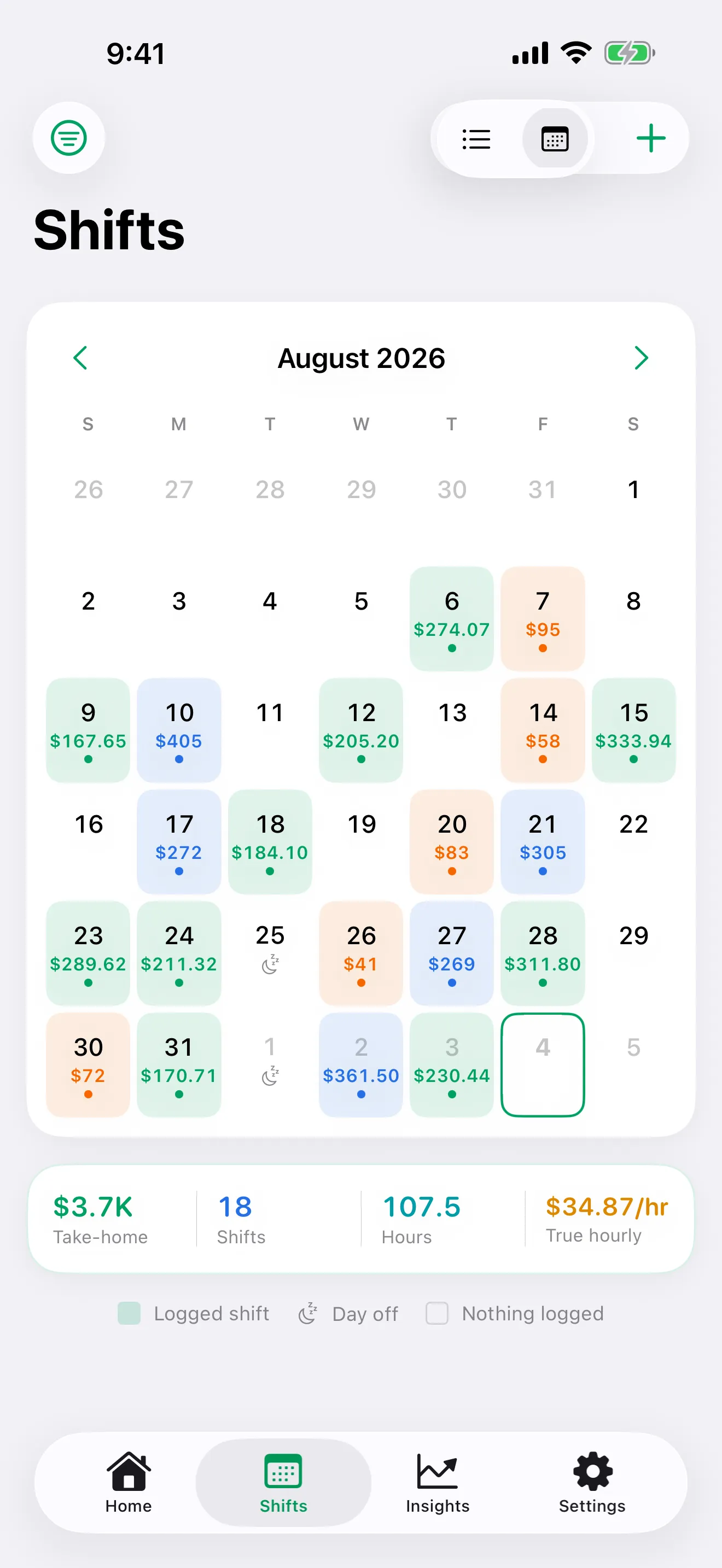
Your month at a glance: the take-home on each day, a dot per job, and the days you marked off, so "off" never looks like "forgot to log". Tap a day to see, edit, or log.
Automatic tip-out
Set your rules once (percent of sales or tips, or a flat amount) and every shift splits the tip-out for you.
Know what your paycheck should be
From the shifts in a pay period, Tipfolio figures the gross the check should come to. Log the stub and see the difference in dollars and in hours at your wage, plus a weekly check against your state minimum.
Know what to save for taxes
Pick your state and see what to set aside from your tips, with the 2025 tips deduction applied if it fits your work. Service charges are kept apart from tips, because the IRS does.
Your monthly tip report
Tips of $20 or more in a month go to your employer in writing by the 10th. Tipfolio totals them per employer and hands you the statement to sign.
A photo of your checkout
Snap the checkout slip or the pay stub and it stays with the shift, compressed, private, and one tap away when a number needs checking.
Best days, best times, and last month
Which weekday pays, whether lunch or close pays better, and how this month compares with the one before and with a year ago, all from your own numbers.
Miles and expenses
Log miles per shift at the IRS standard rate, plus gas and supplies. Free, and they sit right next to what you earned.
Every job in one place
Two jobs free, unlimited with Premium. See combined and per-job totals side by side.
Private by design
No account, no tracking, no server holding your income. Everything stays on your device and in your own private iCloud, and you can lock the app behind Face ID.
How it works
Log the shift
After you clock out, add tonight’s cash, card, and hours, or clock in when you start and the hours fill themselves in. About half a minute either way.
See your real pay
Take-home, true hourly, and the tip-out split, updated the moment you type.
Track and report
See the month on a calendar, watch your best days and shift times, check each paycheck against your shifts, hand your employer the monthly tip report, and export a year-end tax packet.
One screen answers "what did I make?" Another shows the whole month.
Tonight, this week, this month: take-home, true hourly, and the cash/card/tip-out breakdown, always current the moment you log. Then the calendar: every shift on its day with the take-home in the cell, a dot per job, and the days you marked off, so a day you didn't work never looks like a day you forgot. Tap any day to see, edit, or log. Both free.
Try the math yourself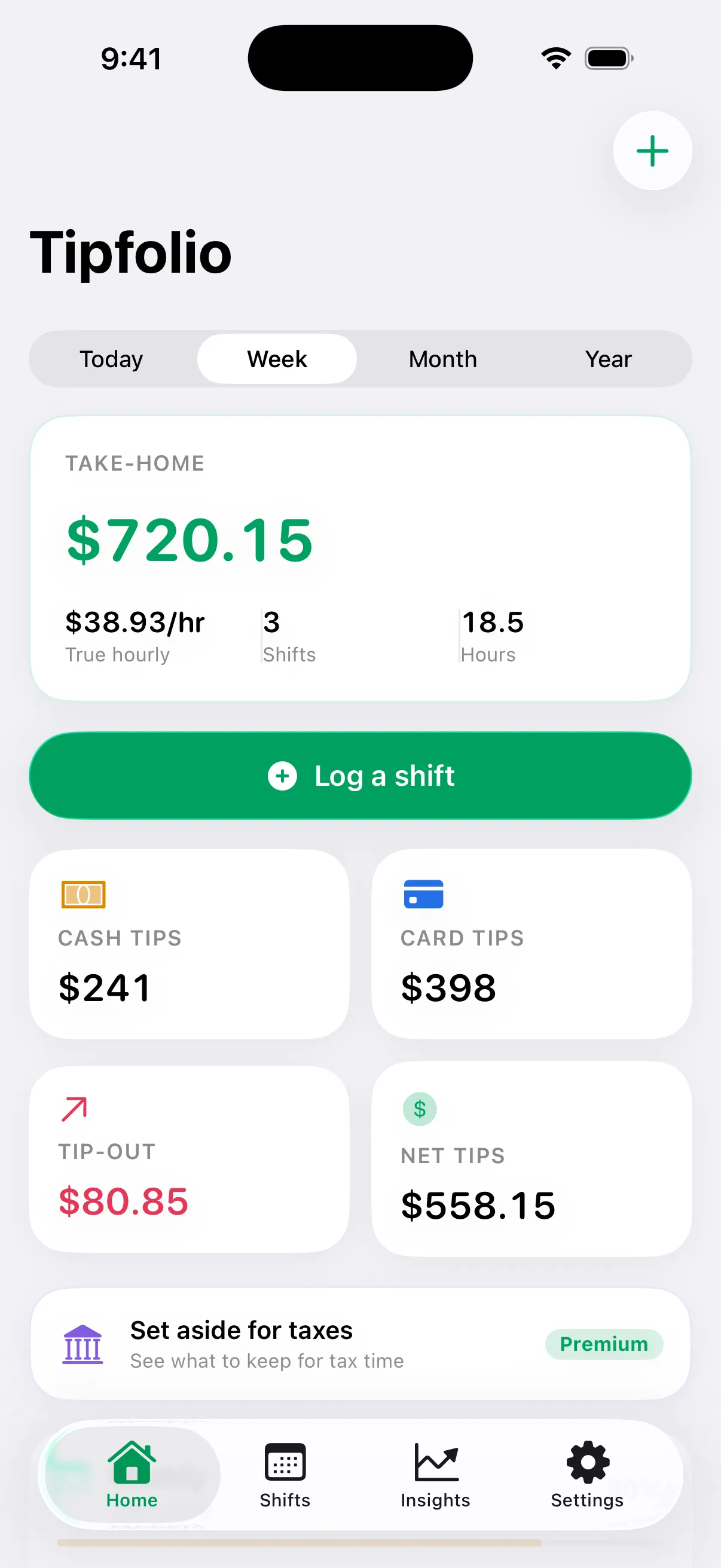
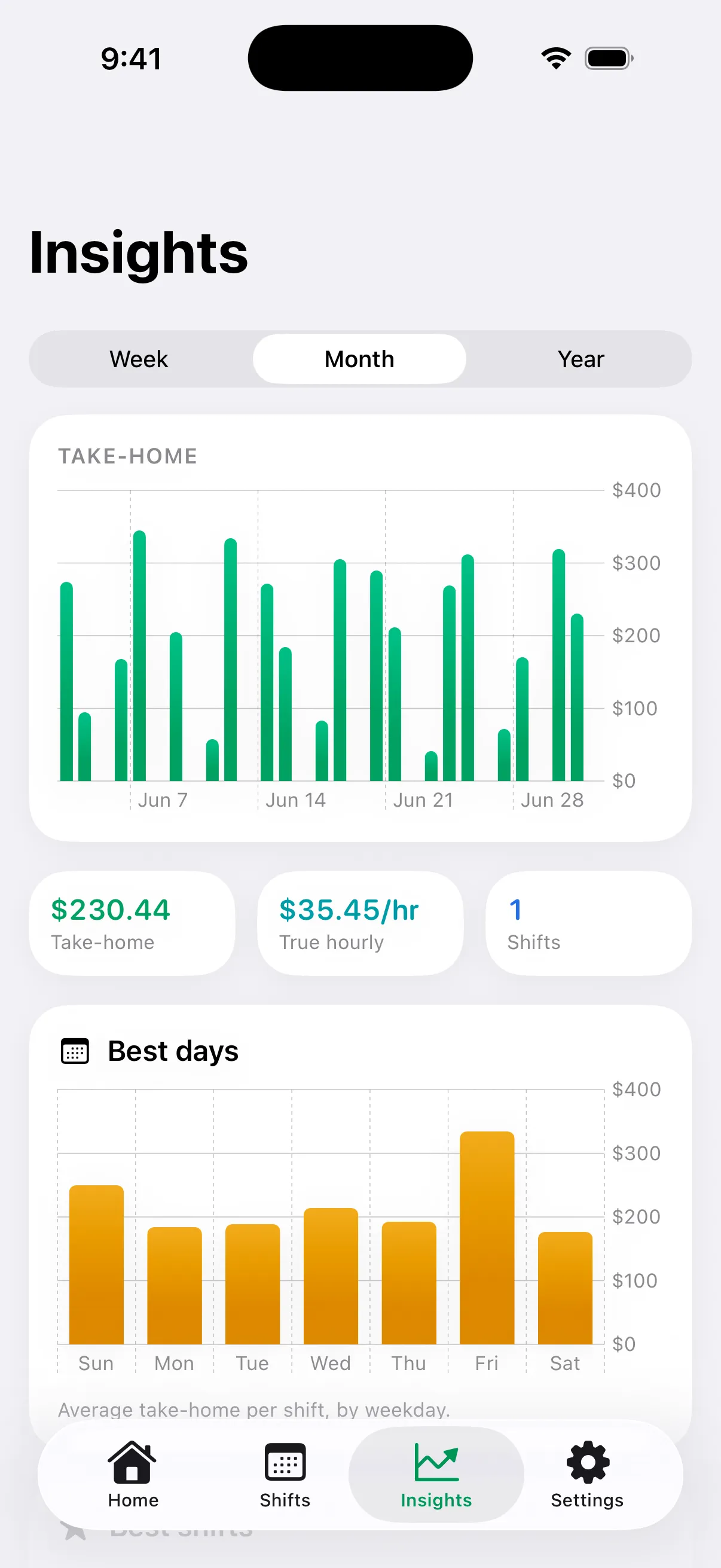
See your best shifts, best days, and where the money is.
Premium turns every logged shift into answers. Which day pays best, and whether lunch or close does. How this month compares with last month and with a year ago. What share of sales you take in tips. What each job is really worth. Then it projects your month and year from your own numbers, tells you what each paycheck should come to, checks your pay against your state minimum, and writes the tax paperwork at the end of it.
See what Premium addsSet up in about a minute.
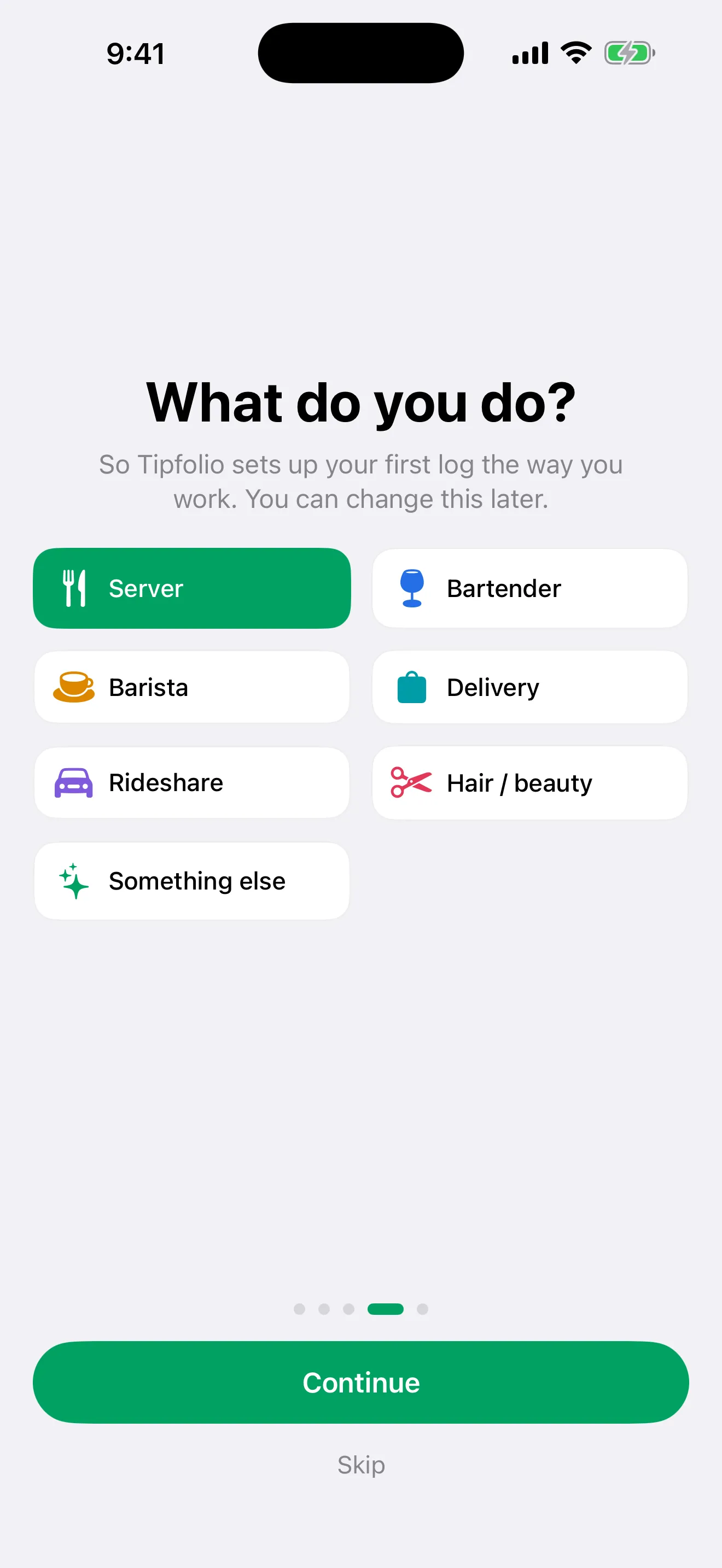
Tell Tipfolio what you do (serve, tend bar, deliver, drive, cut hair) and it tailors the first log to how you work: sales and tip-out fields for servers, miles for drivers. No account, no forms, no tutorial you have to sit through.
- No sign-up: open the app and log
- Your role shapes the quick log
- Log by voice with Siri or from your Apple Watch, and keep today's total on your home screen
- Reminders only on the days you actually work, and never after you have logged
- Already tracking in a spreadsheet or another app? Tipfolio asks on first launch and imports the CSV, history intact
Switching fromServerLife, TipSee, Just the Tips? Here is exactly what carries over.
Honest pricing. No hidden charges.
The market asked for a free tip tracker without surprises. Here it is.
Free
$0forever
Everything you need to log and see your real pay.
- 30-second shift logging, by hours or by start and end time with breaks
- Clock in with a Lock Screen shift timer
- Real take-home and true hourly
- Every shift on a calendar, with daily, weekly, and monthly totals
- Two jobs
- A photo of your checkout on any shift
- Mileage and expense tracking
- Log from Siri or Apple Watch, with a home screen widget
- Shift reminders that never nag
- CSV import from any spreadsheet or tracker, and CSV and PDF export, always
- Private and offline, no account, with Face ID lock
Coming soon to the App Store
Most popular
Premium
$11.99per year
The depth: analytics, tip-out, taxes, and more.
- Trends and analytics: best days, best shift times, and this month against last
- Automatic tip-out splits
- Unlimited jobs
- Tax set-aside, monthly tip report, and year-end tax packet
- Paychecks: what each check should be, what arrived, and the state minimum-wage check
- Earnings goals and backup
Coming soon to the App Store
7 days free, then $11.99/year. Cancel anytime.
Lifetime
$19.99once
Pay once, keep Premium forever.
- Every Premium feature
- No subscription
- One payment, yours to keep
Coming soon to the App Store
Questions, answered
Is Tipfolio really free?
Yes. Logging shifts, the clock-in shift timer, the calendar, seeing your take-home and true hourly, viewing totals, two jobs, photos of your checkouts, and importing and exporting your data are free forever, with no hidden charges. Premium adds analytics, automatic tip-out, unlimited jobs, tax tools including a monthly tip report, paychecks, goals, and backup for $11.99 a year or $19.99 once.
Where is my data stored?
On your device and in your own private iCloud. Tipfolio has no account and no server that holds your income, so nothing is tracked or sold, and you can lock the app behind Face ID. Moving to a new phone is free either way: export a CSV and import it there, or restore the one-file backup Premium saves. Restoring is always free, even if your subscription lapsed.
Can I bring my history from a spreadsheet or another app?
Yes, and it is free. Export a CSV from your spreadsheet or your old tip tracker (ServerLife, TipSee, Just the Tips, or any other) and import it: Tipfolio asks on first launch, and the importer is also in Settings. It recognizes the columns those apps use, previews what it found, skips duplicates, and keeps your history, start and end times included. A date column plus tips or hours is all it needs.
How does the tax set-aside work?
You pick your state and Tipfolio estimates a rate from federal, FICA, and state income tax, then shows what to set aside from your tips. It is an estimate to help you save, not tax advice or a filing. Always confirm with a tax professional.
Can I track more than one job?
Yes. Two jobs are free, with combined and per-job totals. Premium removes the limit for anyone juggling two restaurants plus delivery.
Do I need to create an account?
No. There is no sign-up and no password. You open the app and start logging.
Can Tipfolio prepare the monthly tip report for my employer?
Yes, with Premium. If you take $20 or more in tips in a month at a job, you are required to report that month’s total to that employer in writing by the 10th of the next month. Tipfolio totals your logged shifts per employer and produces a statement PDF with the cash, card, and tips-paid-out lines filled in. Your name, address, and Social Security number are left blank to fill in by hand, because the app never stores them.
Can Tipfolio tell me what my paycheck should be?
Yes, with Premium. From the shifts in a pay period it figures the gross the check should come to: your base wage for the hours, plus card tips if they come through payroll, plus any service charges, minus the tip-out if payroll takes it. Log the gross from your stub and Tipfolio shows the difference, in dollars and in hours at your base wage, which is what you take to a manager. It also checks each workweek against your state’s minimum wage: where a tip credit is allowed, cash wages plus the tips you kept have to reach the full minimum, and the employer owes the difference when they do not. Estimates from your own log to compare against your stub, not legal advice.
Is there a calendar view?
Yes, and it is free. The Shifts tab shows the month with every shift on its day, the take-home in the cell, a dot per job, and days you marked off, so a day you did not work looks different from a day you forgot to log. Tap any day to see, edit, or log a shift there.
Start seeing what you really make.
Tipfolio is launching soon on iOS. Until then, every calculator on this site is free: no account, nothing to install.